

On snapchat if you are getting too many friend suggestion notifications and want to turn off snapchat keeps showing you friend suggestions and disable friend suggestion notifications on snapchat then you can easily do that by going to settings and turn off notification settings and un-sync contacts and other methods. So, let’s dive in deeper and see.
Getting too many friend suggestion notifications is always irritating or any notifications on snapchat and you can change notification settings and turn notifications off and set notifications as you prefer.
Turn Off Snapchat Friend Suggestion Notifications
Below methods will help you get rid of people you know or friend suggestions notifications on snapchat on iPhone and android as well.
Step 1: Open snapchat app on your iPhone or android
Step 2: Click on Profile icon on top left side.
Step 3: Select gear icon on top right side and tap on it.
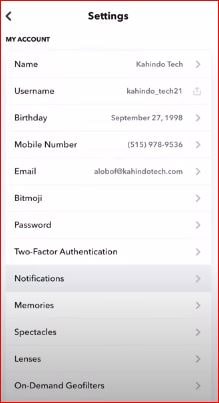
Step 4: Scroll down and find notification settings and tap on Notifications
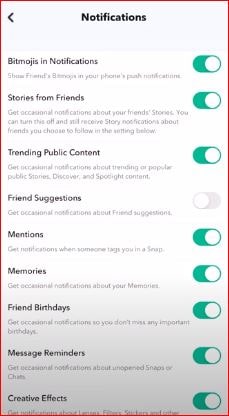
Step 5: Find friend suggestions option and toggle the button next to it and disable friend suggestion option.
That’s it, once you turn off friend suggestions option and turn it off then you will not receive any friend suggestion notification option on snapchat any more and this method works for both android and iPhone with any iOS.
Why I am Receiving Snapchat Friend Suggestion Notifications
If you have enabled the friend suggestion option in notification settings on snapchat then snapchat will notify you whenever it finds friend suggestions notification and to get rid of snapchat friend suggestion notification -> profile settings -> Notifications and turn off friends suggestion on snapchat.